
Finish tasks, unlock apps.
The apps you choose stay locked until you complete your tasks.

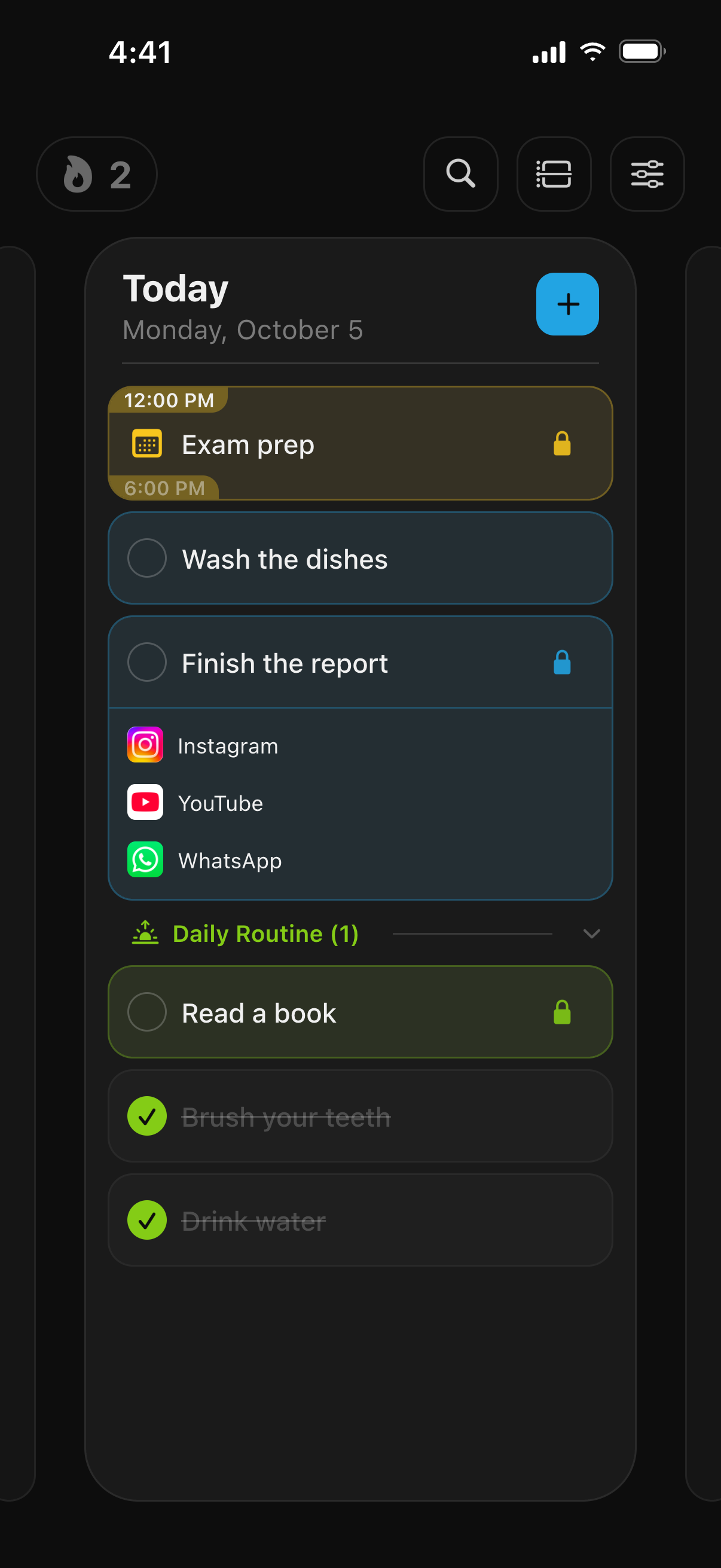
Tasks, habits and events, all in one app.
Add a lock to any of them, and the apps you choose unlock only when the work is done.
Open a locked app, see what's left to do.
Instead of the app, you see the tasks you still need to finish.
○ Finish the report
○ Read a book
All done? Just be honest.
Before the lock lifts, a short countdown gives you a few seconds to think it over.
Track your habits, don't break the chain.
See how many days in a row you've kept up each habit, all on one page.
Your events stay in sync with Apple Calendar.
Events you add to Apple Calendar show up in TaskLock too, and any of them can keep apps locked until it ends.
See what's on today without unlocking your phone.
Your tasks and events show up on your Lock Screen.
Add a task on iPhone, pick it up on iPad.
Your tasks, habits and events sync across your devices through your own iCloud account.
Is TaskLock right for you?
See how it works for studying, and how it differs from apps like Opal and Forest.
Common questions
Short answers to the questions people ask most.
What is TaskLock?
TaskLock is a to-do list, habit tracker and calendar for iPhone, iPad and Apple Watch. Its built-in app blocker keeps the apps you choose locked until your task is done.
Is TaskLock free?
Yes. It's free to download, and app locking is part of the free version. You get 3 tasks in total (completed ones count too), 1 habit, 1 event a day and 2 calendars. TaskLock Premium removes those limits.
Can I remove a lock early?
You can, but there's a short countdown first, and it uses up one of your Daily Changes. Checking off a task has the same countdown.
Does TaskLock need an account or internet?
No. There's no account to create, and everything works offline, including locks.
Is there an Android version?
No. TaskLock only runs on Apple devices.
Is there an app that locks your phone until you complete a task?
Yes, that's exactly what TaskLock is for. Add a lock to a task and choose the apps. They stay locked until the task is checked off or the day ends. The rest of your phone stays open.
Can I use TaskLock as a daily to-do list?
Yes. You see the day's tasks, habits and calendar events together, and you can move missed tasks to today. Locks are optional, so you add them only to the tasks you want.
Can I lock apps until my whole to-do list is done?
Yes. Add each to-do as its own task and choose the same apps for all of them. The apps stay locked until the last of those tasks is checked off or the day ends.
Can I lock games too?
Yes. When choosing apps, pick the Games category or individual games. The games you choose stay locked along with your other apps.
What if I don't finish the task today?
The lock ends at midnight, and the task stays on its day, unchecked. To lock your apps again, open the task, tap Move Task and choose Move to Today. The lock comes back with it. If you move a task to a different day while its lock is still on, TaskLock warns you first, then removes the lock.

Those apps can wait.
Download TaskLock free on the App Store.