
A to-do list that blocks apps until you check things off
TaskLock is a to-do list with an app blocker built in. Add a task, pick the apps that distract you, and they stay locked until the task is checked off. Without locks it is a plain, minimalist daily planner with habits and calendar on the same screen.

Why combine a to-do list and an app blocker
A to-do list tells you what to do. A blocker stops you from doing something else. Kept in separate apps, the two never meet: the list does not know you are scrolling, and the blocker does not know the task is still open. TaskLock puts them in one place, so the lock on Instagram is attached to “Finish the essay” and lifts the moment that line is checked off.
The to-do list itself
- One screen for the day. Today’s tasks, events and habits sit on a single daily card, with yesterday and tomorrow a swipe away.
- Timeline. All past and upcoming plans in one list, filtered by tasks, habits or events, with completed items hidden or shown.
- Saved tasks and tags. Save tasks you repeat and group them with tags, for example “Weekly review” or “Packing”. Add one to a day, or add every saved task with that tag at once. On the Home screen, everything with the same tag stays together.
- Reminders and details. A notification at a chosen time, plus notes, links with previews and locations when you need them.
- Move, copy, search. Move missed tasks to today in one tap, copy a task to another day, and search by title.
- Quick add. A Control Center button (iOS 18 and later) adds a task without opening the app.
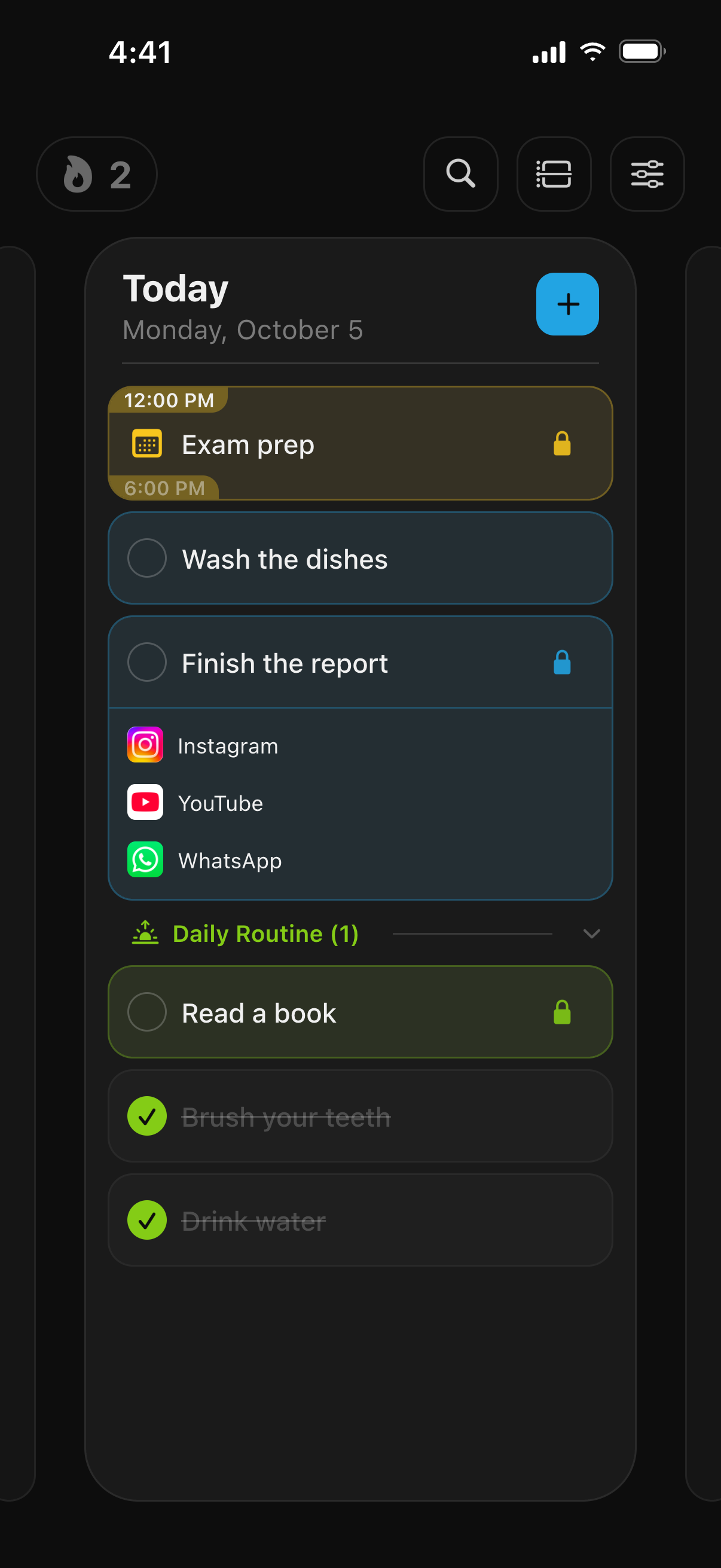
How a lock attaches to a task
Every task has an App Lock field. Leave it empty and the task is a normal to-do. Fill it with apps, app categories or websites from Apple’s Screen Time picker, or with a saved lock group, and those apps are blocked until the task is done. A lock can start later in the day, so tomorrow’s tasks can be planned tonight without locking anything yet. Opening a locked app shows a shield listing the tasks that still hold it, with a button back to TaskLock.
Checking a locked task off goes through a short confirmation countdown that you set between 5 and 30 seconds, and a daily change limit caps how often an active lock can be removed or delayed. The FAQ explains both settings.
Habits and calendar in the same place
Habits repeat every day, on chosen weekdays or every N days, show a streak and history, and can lock apps on each active day until they are done. Events sync both ways with Apple Calendar, with repeat rules, reminders and video call links, and an event lock covers the event’s exact time range. Nothing has to be copied between apps; the plan and the locks live together.
Minimalist by design
TaskLock has one main screen and a single panel for everything else: saved tasks, habits, lock groups and settings. Add a task by typing a title; date, time, reminder, note, link and location appear only when you want them. The date picker, saved tasks, detail fields and link previews can all be hidden. Light, dark and system themes, nine accent colors plus a custom one, and alternative app icons keep it yours without adding clutter.
No account, works offline
There is no sign-up and no login. Tasks, habits, events and settings are stored on the iPhone and the app works fully offline, locks included. An optional backup to your own iCloud Drive keeps the three most recent copies for restoring on a new phone. TaskLock cannot see which apps you use; blocking runs through Apple’s Screen Time framework.
Apple Watch, widgets and Live Activities
The Apple Watch app shows today’s plan, lets you add tasks and events, and checks items off; completing a task on the watch unlocks its apps on the iPhone. Home Screen widgets show the day’s plan and locked items, and Live Activities keep the current tasks and events on the Lock Screen and in the Dynamic Island.
Free to start
TaskLock is free to download, with app locking, tasks, habits and events included and limits on how many you can create. TaskLock Premium removes the limits. Compare it with other focus apps on the comparison page.
Common questions
Can I use TaskLock as a normal to-do list without blocking?
Yes. A task with no apps selected is an ordinary to-do item. The list, habits, calendar sync, reminders, widgets and Apple Watch app all work without ever granting Screen Time permission.
Does it sync between iPhone and Apple Watch?
Yes. The iPhone is the single source of truth and the watch syncs with it. Tasks added or completed on either device appear on the other, and completing a task on the watch unlocks its apps on the iPhone.
Is there a Mac, iPad or web version?
No. TaskLock runs on iPhone and Apple Watch only. Your data stays on the iPhone, with an optional iCloud Drive backup for moving to a new phone.
Get TaskLock free
The to-do list that locks apps until you’re done. iPhone and Apple Watch.