
The app that blocks apps until your tasks are done
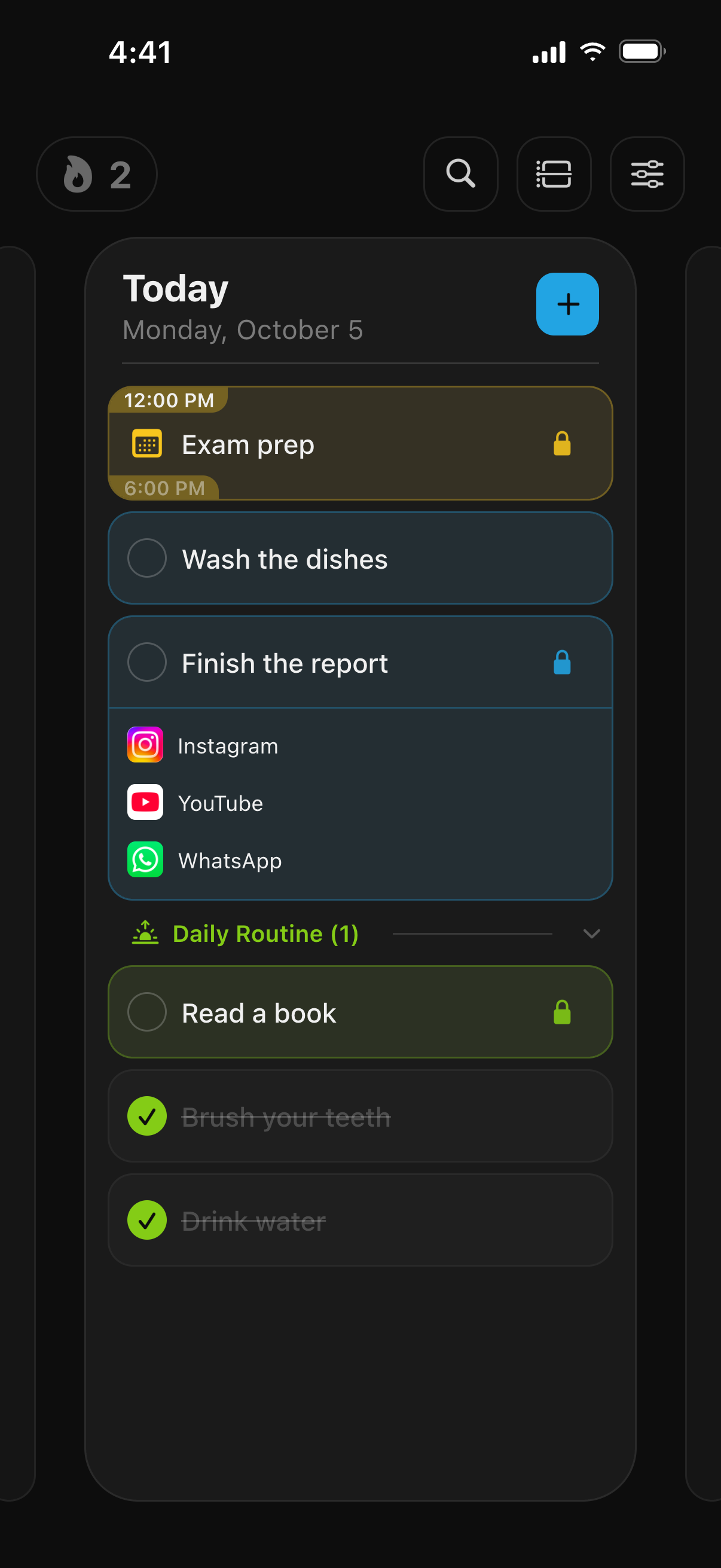
TaskLock keeps the apps you choose locked until you check off a task, finish a habit or an event ends. It is a free iPhone to-do list with Apple’s Screen Time blocking built in, so there is no second app to set up.

How it works
- Add a task. Type what needs to get done, for example “Finish the report” or “Clean the kitchen”. Add a reminder, a note or a link if you want; none of it is required.
- Choose the apps to lock. Tap App Lock and pick apps, whole categories such as Social or Games, or websites from Apple’s Screen Time picker. Or choose a saved lock group like “Social media”.
- Get to work. If you open a locked app, a shield appears instead of it. The shield says “Complete your tasks to unlock!” and lists the tasks still keeping that app locked.
- Check the task off. A short confirmation countdown asks “All done? Just be honest.” Then the apps unlock, on their own, the moment the task is complete.
Why tie the lock to a task
With TaskLock, the lock lasts as long as the work. Check the task off and the apps come back. If you want a fixed window as well, you can have one. An event lock covers exactly the event’s time range, so a 2:00 to 4:00 PM study block locks apps for those two hours and then lets go.
Because the to-do list and the app blocker are the same app, there is nothing to keep in sync. You plan the day on one screen, and the locks follow the plan.
Three kinds of lock
- Task lock: apps stay locked until the task is checked off, however long it takes.
- Habit lock: apps lock on every day the habit is active, until it is done. Good for “Read 30 minutes” or “Practice piano”.
- Event lock: apps lock from the event’s start to its end. Works with events synced from Apple Calendar too.
Example setups
- Homework: “Math problem set” locks Instagram, TikTok and YouTube. See the step-by-step guide, or read how TaskLock works as an app blocker for studying.
- Chores: “Laundry” and “Dishes” lock Netflix and games until both are done.
- Deep work: a “Write proposal” task locks Slack and social apps until the proposal is written, or a calendar event locks everything from 9:00 to 11:00 AM.
- Evenings: a daily habit “Plan tomorrow” locks YouTube until the plan is written.
- Whole list: give every task on today’s list the same lock group. The apps unlock only when the last one is checked off.
Keeping yourself honest
TaskLock is built for people who want to keep themselves honest, not as a parental control, so it makes cheating slow rather than impossible. Completing a task early, removing a lock or pushing its start later goes through a confirmation countdown of 5 to 30 seconds. A daily change limit, from 0 to 5, caps how many times you can change an active lock in a day; at 0, an active lock cannot be touched until the task is done. Deleting the app does remove its locks, as with any Screen Time app, which is why the strictest setup pairs TaskLock with a Screen Time passcode that someone else keeps. More in the FAQ on bypassing the lock.
Also on your wrist
The Apple Watch app shows today’s tasks, events and habits. Check off a task on the watch and its apps unlock on the iPhone, so the phone can stay in another room while you work. Home Screen widgets and Live Activities on the Lock Screen show what is still open.
What it costs
TaskLock is free to download. The free version includes app locking, tasks, habits and events, with limits on how many you can create. TaskLock Premium removes those limits. There is no account to create, the app works offline, and your data stays on your iPhone.
Common questions
Can I lock apps until my whole to-do list is done?
Yes. Give each task on the list the same lock, for example the “Social media” group. The shield on a locked app lists every task still holding it, and the apps unlock only when the last of those tasks is checked off.
Does it work with games?
Yes. Pick individual games from the Screen Time picker, or lock the whole Games category so that any game, including ones you install later, stays locked until the task is done.
What if I don’t finish the task today?
The lock stays on until you complete the task. If you move the task to another day, its active lock is removed, and TaskLock warns you before that happens. Missed tasks can be moved to today in one tap the next morning.
Get TaskLock free
The to-do list that locks apps until you’re done. iPhone and Apple Watch.